How to File Your INSTANT 2290 E-FILE Highway Tax
· Trucking Compliance Service
If you operate heavy commercial vehicles on public roads, dealing with the IRS is an unavoidable part of the job. But it doesn’t have to be a slow or frustrating process. Today, fleet managers and owner-operators can avoid long lines and confusing paperwork by using an INSTANT 2290 E-FILE Highway Tax service.
Whether you are a single owner-operator or managing a massive fleet, staying compliant is critical to keeping your trucks out of the scale house penalty box. In this comprehensive guide, we will explain exactly what the highway tax is, how much it costs to file, and the step-by-step process to get it done instantly.
What is the Heavy Highway Vehicle Use Tax (HVUT)?
Before diving into the filing process, it is important to understand what you are actually paying for.
The Form 2290 (HVUT) is a Federal Excise Tax imposed on commercial vehicles operating on public US highways. This tax specifically targets heavy vehicles that cause the most wear and tear on the roads.
The funds collected by the IRS from this tax are allocated directly to highway construction, road maintenance, and infrastructure improvements across the country.
Who needs to file?
You are required to file Form 2290 if your vehicle meets the following criteria:
- It operates on public highways.
- It has a gross taxable vehicle weight of 55,000 pounds or more.
Why Use an INSTANT 2290 E-FILE Highway Tax Solution?
In the past, truckers had to mail their Form 2290 to the IRS and wait weeks for a stamped Schedule 1 (the proof of payment required to renew your tags).
By utilizing an INSTANT 2290 E-FILE Highway Tax system, the process becomes seamless:
- Speed: You receive your stamped Schedule 1 in minutes, not weeks.
- Accuracy: Built-in error checking prevents you from making mistakes that could delay your filing.
- Security: Your data and payment information are protected using industry-standard SSL encryption.
How Much Does the E-Filing Service Cost?
We believe in complete transparency. Using a certified filing system saves you time, and our pricing structure is simple and affordable.
Here is a breakdown of the processing fees associated with the INSTANT 2290 E-FILE Highway Tax portal:
| Service Type | Pricing | Details |
| Single Truck Filing | $35.00 | Flat fee per truck for fast, secure processing. |
| Multiple Trucks | $35.00 × # of Trucks | Easily scale your filing based on your fleet size. |
Disclaimer: The $35.00 fee is for the e-filing service processing. The actual IRS Tax Payment (the money owed to the government based on your vehicle’s weight) is calculated separately at checkout.
How to File Your INSTANT 2290 E-FILE Highway Tax (Step-by-Step)
Filing your highway tax online is a straightforward, 4-step process. Gathering your information beforehand will help you complete the form in just a few minutes.
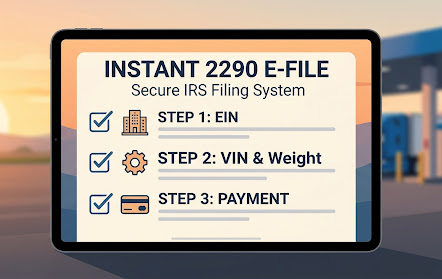
Step 1: Provide Your Business Information
To start, you will need to input your official company details exactly as they appear on your IRS documents.
- Business Name & Type: Select whether you are an LLC, Corporation, Partnership, Sole Proprietorship, or Estate/Trust.
- Federal Tax EIN: Your Employer Identification Number is mandatory (Social Security Numbers are not accepted for Form 2290).
- Contact Info: Your business address, phone number, and email address so you can receive your stamped Schedule 1.
- Signing Authority: The First Name, Last Name, and Title of the person authorized to file the tax.
Step 2: Enter Vehicle Information
Next, you will register the specific trucks you are paying taxes on. For each vehicle, you must provide:
- Tax Year: Select the appropriate period (e.g., July 2024 – June 2025).
- VIN Number: The exact Vehicle Identification Number.
- Taxable Gross Weight: Choose your weight bracket (55,000 – 75,000 lbs, 75,001 – 80,000 lbs, or Over 80,000 lbs).
- Mileage & Usage: Specify if the vehicle traveled over 5,000 miles in the selected year, and whether it is used primarily for logging.
Step 3: Review Payment Summary
Once your vehicle information is in the system, it will calculate your Total 2290 Filing Fee (e.g., 1 truck = $35.00) alongside your Total IRS Tax Payment.
Step 4: Submit Secure Payment
The final step is to pay the IRS and the processing fee. The system offers two highly secure payment methods:
- Bank ACH: Direct transfer using your Bank Name, Routing Number, and Account Number.
- Credit/Debit Card: Quick processing (Please note: A standard 3% processing fee applies to card payments).
Need Help With Your Filing?
Don’t let IRS paperwork keep your trucks off the road. If you have questions about your Gross Vehicle Weight, your EIN, or the filing process, our compliance experts are standing by to assist you.
You can rely on Trucking Compliance Service to streamline all your regulatory needs.
Contact Us Today:
Phone: (855) 368-9393
Location: 4141 Northgate Blvd Suite 6, Sacramento CA 95834
Hours: Mon–Fri: 8am–7pm PT | Sat: 8am–2pm PT | Sun: Closed
Click Here to Start Your INSTANT 2290 E-FILE Now
Frequently Asked Questions (FAQs)
1. Is Form 2290 E-Filing Secure?
Yes. Certified e-filing systems use industry-standard SSL encryption to protect your business information and tax payments, ensuring a secure transaction with the IRS.
2. Can I use a credit card to pay my Form 2290 Tax?
Yes. You can pay your IRS tax payment and processing fee using a credit or debit card, although a small processing fee (e.g., 3%) usually applies to this payment method.
3. What happens if I make a mistake on my Form 2290?
It is important to provide accurate information. Making a mistake can lead to delays in receiving your Schedule 1 or even potential IRS penalties. Using a certified e-filing system often helps you review your information before final submission.
Need help? Call 888-700-5704 or contact us.