The 2026 Electronic DVIR (eDVIR) Rule: What Truckers Must Know
· Trucking Compliance Service
If you run your own truck or a small fleet, you’ve filled out a Driver Vehicle Inspection Report (DVIR) more times than you can count. In 2026, the way you do that paperwork officially changed. On February 19, 2026, the FMCSA published a final rule that formally authorizes electronic DVIRs (eDVIRs), effective March 23, 2026. Here’s what the rule actually says, what it means for you, and how to switch the smart way.
What the 2026 eDVIR rule actually changed
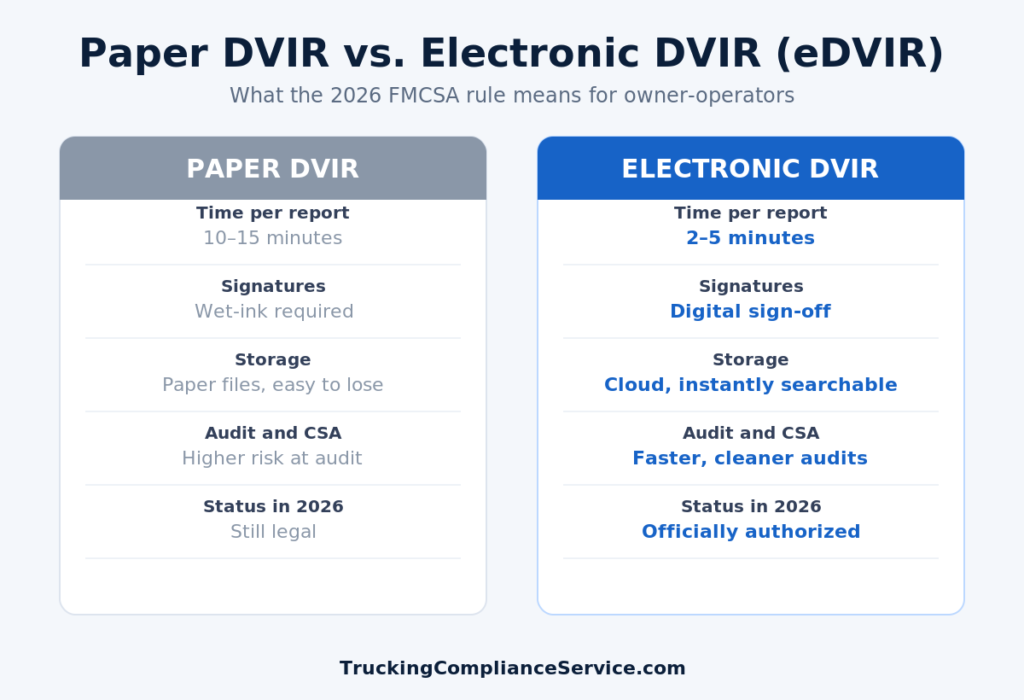
Electronic DVIRs have technically been allowed since 2018 under 49 CFR 390.32, but the old wording left enough gray area that some carriers, auditors, and even attorneys read it differently. The 2026 final rule removes that ambiguity. It makes clear that creating, signing, and storing your DVIR electronically — with no wet-ink signature required from either the driver or the mechanic — is fully permitted. Paper DVIRs are still legal, so nobody is forcing you to switch. But carriers still running paper are now at a measurable disadvantage at audit time and in day-to-day efficiency.
Why this matters for owner-operators
The DVIR is one of the first documents a DOT auditor or roadside officer asks for. Sloppy, missing, or illegible paper reports are a common, avoidable source of violations that feed your CSA score. Going electronic tightens this up in a few concrete ways:
- Faster reports. An eDVIR takes about 2–5 minutes versus 10–15 for paper — roughly 40–60 hours saved per driver per year.
- Cleaner audits. Records are time-stamped, legible, and searchable in seconds instead of dug out of a glovebox or filing cabinet.
- Fewer lost documents. Cloud storage means a coffee-stained or missing form doesn’t become a compliance problem.
- Stronger defect tracking. Reported defects and the required repair sign-off are linked together, which is exactly what an auditor wants to see.
How to switch to eDVIRs the right way
You can absolutely set this up yourself. Here’s the basic path:
- Pick a compliant app or ELD that supports eDVIRs. Many ELD providers already include electronic DVIR features — check that yours captures driver and mechanic e-signatures and stores reports for the required retention period.
- Confirm the required fields. Each eDVIR still needs the date, truck/trailer identification, any defects (or a “no defects” note), the driver’s signature, and the repair certification when something is fixed.
- Set your retention. Keep DVIRs and the related repair records on file for the periods FMCSA requires, and make sure your system backs them up.
- Train your drivers. A five-minute walkthrough prevents the most common error: skipping the defect and repair sign-off.
- Spot-check the first few weeks. Review a handful of submitted eDVIRs to confirm they’re complete before an auditor ever sees them.
The bottom line
The 2026 eDVIR rule doesn’t force you off paper, but it clears the way to a faster, cleaner, audit-proof process — and the carriers who move first will have the tidier compliance record. If you’d rather not piece the setup together yourself, that’s exactly the kind of thing we handle every day.
Want your DVIRs, audits, and filings handled so you can focus on driving? Start your onboarding today and let our team keep you compliant and audit-ready. Worried about violations on your record? See our CDL protection options.
Need help? Call 888-700-5704 or contact us.